Open-source
firmware.
Fully auditable, deterministically built, and cryptographically signed. Verify every byte of code running on your device — no trust required.
- Deterministic & reproducible builds
- 100% open-source hardware & software
- Verify every byte running on your device
Trust through
transparency.
Firmware updates, done safely.
KeepKey Desktop handles updates end-to-end. Every release is signed — your device verifies the signature before accepting the image.
Open KeepKey Desktop
Connect your device and launch the app. It automatically checks the latest signed firmware release on GitHub.
Confirm the update
The app shows the current and target version. Review the release notes, then click Update.
Approve on device
KeepKey displays the firmware hash on its screen. Verify it matches the published hash, then confirm.
Done
Your device reboots with the new firmware. Seeds and accounts are untouched — keys never leave the hardware.
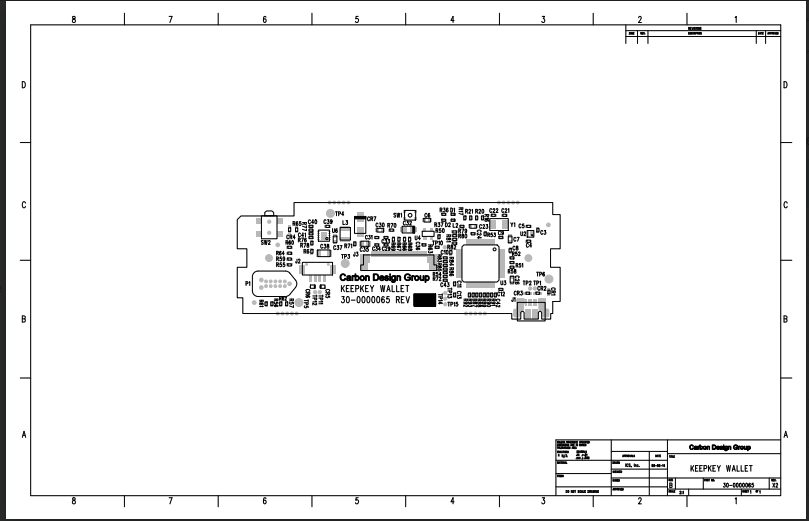
Complete hardware transparency.
Unlike most hardware wallets, KeepKey publishes PCB schematics, fabrication files, and assembly drawings. Inspect every component, reproduce the board, or build your own from scratch.
Open hardware design
PCB layouts, schematics, and Gerber files available for review and reproduction.
Verifiable firmware
Build from source and compare the hash — confirm no hidden code runs on your device.
DIY-friendly
Step-by-step guide to building a KeepKey from raw components.
The DIY hardware wallet philosophy.
Why open-source hardware wallets are the future of Bitcoin security.
Ready to verify your security?
Explore the firmware source, build it yourself, or dive into the DIY guide to construct your own KeepKey from scratch.